
Practical templates for custom umbrella orders
Keep product, artwork, sample and delivery decisions together. These blank templates support a purchasing discussion; they are not test reports, price offers or production drawings.
At a glance
Use the quotation comparison, artwork brief and sample approval files in sequence: define the product, compare the same scope, confirm the design and record the physical sample decision. Keep a dated project revision so the templates describe one consistent order.
Compare complete quotations
Record the same model, quantities, print, packaging and trade terms for each supplier.
Download quotation comparison (CSV)Prepare your artwork brief
Specify panel positions, print dimensions, colours and revisions. Request a model-specific production template from the supplier.
Download artwork brief (CSV)Record sample approval
Keep observations, corrections, approval owners and a dated sample reference together.
Download sample approval record (CSV) · Read the sample checklistMeasure the right dimension
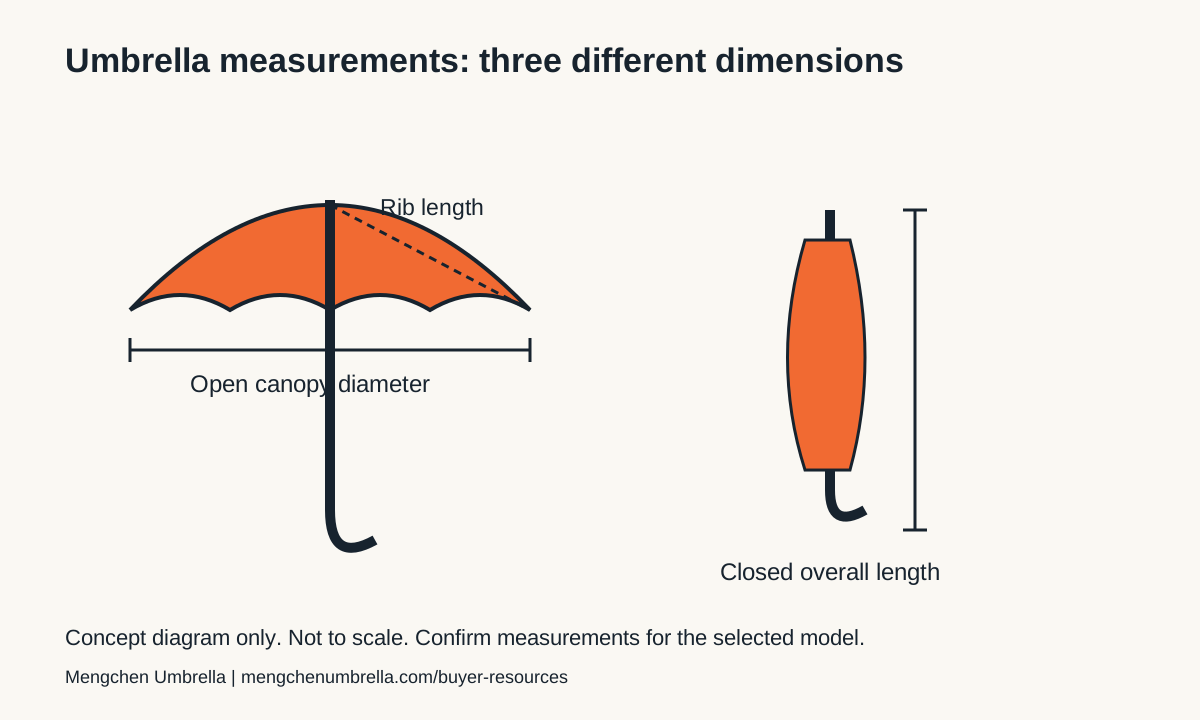
Rib length, canopy diameter and closed length are different. The diagram is not to scale and contains no model-specific measurements.
Download measurement diagram (SVG)How to use the templates: an illustrative example
The example below shows how to record a decision. It is not a customer case, quotation or promise of production capability.
| Field | Illustrative entry | Follow-up |
|---|---|---|
| Model | Record the selected catalogue model and revision | Ask for the current specification sheet |
| Artwork | One outer-canopy logo, with dimensions and colour reference supplied by the buyer | Confirm printable area and compatibility with the actual fabric |
| Approval | Record the sample reference and any requested corrections | Keep a dated written approval before bulk production |
| Delivery | Record the real destination and required arrival date | Confirm freight, customs and destination-charge responsibilities |
Is the measurement diagram a production pattern?
No. It explains three dimensions and is not to scale. A printable panel pattern must be supplied or confirmed for the selected model.
Does completing the checklist certify the umbrella?
No. A completed checklist records the review. A required performance claim needs the applicable test evidence for that model and order specification.
Can I use these resources in a purchasing guide?
Yes. You may adapt the original templates and diagram for purchasing or editorial use. Attribution and a link to this resource page are appreciated; product photos and third-party artwork are excluded.
Use and share these resources
You may copy and adapt the original templates and diagram on this page for purchasing, teaching or editorial use. Please credit Mengchen Umbrella and link to this page when sharing publicly. This permission covers only these templates and this diagram; it does not cover product photographs, third-party artwork or customer logos.
Umbrella printing guide · Compare promotional formats · Discuss your project
Start with the decision you need to make
If you are still choosing a product, begin with the specification and measurement guides before filling every template. Record the intended use, carrying format, model shortlist and quantity allocation. This gives the supplier enough context to explain suitable options without treating an incomplete brief as a final production instruction.
If you already have comparable product specifications, use the quotation comparison to identify differences in commercial scope. If the main uncertainty is branding, use the artwork brief to organize files, panel positions and colour references. If a physical sample has arrived, use the approval record to connect observations and corrections to the agreed brief. Each file supports a specific decision rather than replacing all purchasing documents.
Complete the quotation comparison without hiding gaps
Give every supplier the same dated request and enter the quoted model, quantity, currency and delivery basis. Separate unit cost from setup, sample, packaging and transport charges where the quotation does so. Mark an unknown item for confirmation. A blank entry should not be interpreted as included, free or approved.
Keep alternatives visible. A quotation using a different fabric, mechanism or packaging arrangement belongs in a clearly identified option. Ask the supplier to explain exclusions and validity, then retain the quotation reference in your working file. The comparison helps organize the discussion; it does not calculate a reliable landed cost until shipment responsibilities and destination costs have been established.
Prepare artwork before requesting a final proof
Use a distinct filename and revision for each design. Identify the model, component or canopy panel, intended dimensions, orientation and colour reference. Provide usable artwork files and tell the supplier whether they are concepts or production-ready files. Ask for a model-specific template rather than resizing a generic diagram to fit an unfamiliar canopy.
For multiple colours or designs, record which artwork goes with each quantity allocation. Review spelling, logo proportions, seam positions and presentation when folded. Keep packaging artwork linked to its own component and revision. The blank artwork brief is an information checklist; it does not establish print compatibility or provide a production drawing.
Turn the sample record into a clear handover
Enter the actual sample identifier and the specification and artwork revisions used for the review. Record the observation rather than only a yes or no. When something differs, attach a photograph reference, specify the correction and assign an owner. Keep the item open until the agreed evidence has been reviewed.
At approval, retain the dated decision and the reference set production should follow. Use one current working copy and archive earlier revisions. If the buyer changes a requirement later, reopen the affected items and ask for the impact on price, samples and schedule. Share the relevant final files with the people responsible for the order; avoid circulating personal information in blank public template copies.
Use the files with your own purchasing controls
The downloadable CSV files are editable tables. Open them in a spreadsheet application, check that columns and text display correctly, then save a project copy before entering data. Keep a copy of the original blank file so it can be reused. If your spreadsheet application uses a different separator, use its import function and select the appropriate delimiter.
These templates are planning aids. They are not test reports, legal advice, purchase contracts or certification evidence. Add fields required by your organization and destination market, and confirm technical or compliance questions with the appropriate responsible party. Download the current public files from this page when starting a new project, then keep your completed purchasing records within your own controlled process.
Choose the right resource for your next step
| Stage | Resource | Useful output |
|---|---|---|
| Define the product | Specification checklist and measurement diagram | A dated brief with comparable dimensions |
| Compare offers | Quotation comparison CSV | Inclusions, exclusions and questions per supplier |
| Prepare branding | Artwork brief CSV | Design revisions, positions and colour references |
| Review the sample | Sample approval CSV | Observations, corrections, owners and decision |
| Release the order | Your approved project reference set | Consistent specification, artwork, packing and approval records |
Common buyer questions
Are the buyer templates editable?
Yes. The CSV downloads are editable tables. Save a project copy and add fields required by your own purchasing process.
Which file should I use first?
Define the product and dimensions first. Then compare quotations, prepare the artwork brief and record the physical sample review as your project progresses.
Do the templates contain actual prices or confirmed lead times?
No. Enter the quotation and schedule confirmed for your own project. Blank fields are not a price offer or production commitment.
Is the measurement diagram a production drawing?
No. It explains different measurements and is not to scale. Request a technical drawing or production template for the selected model when needed.
Can a completed template prove product certification?
No. A completed planning or approval record does not replace an applicable test report, certificate or other required evidence.
How should multiple people update a project?
Assign a file owner, use dated revisions and identify the current approved copy. Record changes and decisions so the buyer and supplier work from the same reference set.
Put the next decision in writing
Define your umbrella specification · Review sample approval · Download buyer templates
Prepared by Mengchen Umbrella · Content updated . This guide supports purchasing preparation. Confirm the final product, commercial terms and required evidence for your project.